File verificationSignature matches the developer’s certificate
Unmodified file: same certificate as this app’s versions from the official app store, signed by milleniumapps. A signature shows who signed the file, not how the app behaves.
Hi, There you can download APK file "Alarm Clock Millenium" for Android free, apk file version is 6.7 to download to your android device just click this button. It's easy and warranty. We provide only original apk files. If any of materials on this site violates your rights, report us
Screenshots of Alarm Plus Millenium
Description of Alarm Plus Millenium (from google play)
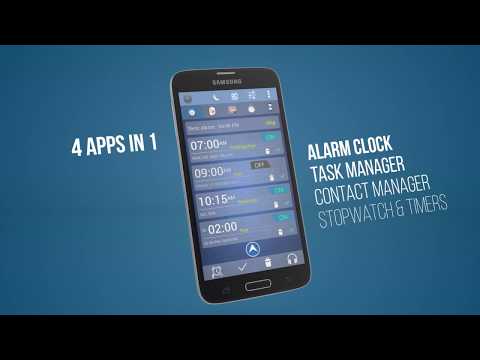
Alarm Plus Millenium is more than an alarm clock. It includes more than five wonderful apps in a one: ★ Alarm clock that is extremely powerful yet easy to use. ★ Timers. ★ Stopwatch. ★ Tasks & To-do list & notes. ★ Contacts manager. ★ Relaxing Media Player of nature sounds for smooth sleep with the decreasing volume.
1 \ Alarm clock + Stopwatch + Timer: Alarm Plus Millenium offers a wide choice of options to wake up at time in the best possible way. It includes progressive alarms for light sleepers as well as extreme challenges for heavy sleepers. The app is one of the highest rating apps as alarm clock.
Alarm Plus Millenium includes the same alarm clock + Stopwatch + Timer as the free version without ads and with ability to skip next alarm up to one week.
2 \ Tasks: With Alarm Plus Millenium , you can add tasks by a very interactive way: ★ Set up a task with your voice just by dictating the word task and the time. ★ Dictate the task to do. ★ Select whether the task is for a precise date and time or within a certain time. ★ Select the repetition frequency of the task. ★ Define and activate a default task profile. ★ See the scheduled tasks in a chronological order...
3 \ Contacts: Alarm Plus Millenium offers you a personalized management of your contacts with their birthdays, you can: ★ Add or import your contacts (name, phone number, Email). ★ Add a picture for each contact. ★ Add the date of birth to be notified for every birthday. ★ Call the contact at any time or send him/her an SMS or Email. ★ Send an automatic and personalized SMS or Email after birthday notification...
4 \ Sleep & Relaxation: Alarm Plus Millenium offers a valuable Android tool to relax during a nap or to help you fall asleep with a very relaxing music, you can: ★ Choose a sound of nature and a relaxing music. ★ Select the duration of playback. ★ Adjust the volume of the music player. ★ Enable the gradual reduction of volume for a smooth transition to the deep sleep.
World Clock: World Clock with up to 600 cities in the world to keep track of time in different corners of the globe. Drag to reorder the cities as it suits you.
Night Mode: Bedside clock with adjustable brightness to rest your eyes at night.
The Millenium Alarm Plus interface is fully customizable, you can choose the background color style as well as the title bar color.
Important Notice: Some battery saving apps or system power managers can prevent alarms from working. Please make sure that it's not the case. Here are some known examples: 1- EMUI: Add the app to protected apps. 2- Acer AID Kit: Remove the app from Energy Organization blacklist. 3- Avoid forcing the app close and exclude it while cleaning the RAM if it forces apps to close. Avoid cleaning app's data as well. 4- In some devices like Xiaomi system periodically kill apps. In this case you need to add the app to "Caution" list. 5- Sony: Make sure that STAMINA mode allows alarms to work. if not then disable it.
Main permissions : - "Read Phone State" permission is needed to mute alarms during a call. - "Storage " permission is needed to read audio files on alarms, backup & restore. - "Modify Audio Settings" is required to set the volume of alarms.
For more information, questions or issues, please visit our website or email us.
V 6.6: - Many improvements. - Adaptation to Android 12. - Better way to skip or modify the next alarm. - Option to sort alarms by date and active state. - Sunrise feature with LIFX smart lights. - QR code and picture challenges and more...
- Progressive snooze option. - Screensaver added (menu or long click on moon icon).
Notice: Please make sure that your battery saver or task killer apps will not prevent alarms from working.
Please rate this app
Alarm Plus Millenium Version History: APK Size & Android Support
Explore the version history of Alarm Plus Millenium for Android and see how the app has evolved over time. This section tracks versions added to the apk.cafe catalog, including download size, declared permissions, and Android compatibility. Select a point on a chart to explore historical version data.
Alarm Plus Millenium Catalog Statistics
Versions added in the last 12 months0
Last version added
Catalog update frequencyNo versions added for over a year
Alarm Plus Millenium Versions Added by Year
20221 version added
New versions in the catalogNo updates since Jul 2022
1 new Alarm Plus Millenium version was added to the apk.cafe catalog in 2022. The catalog contains 28 versions dating back to May 2013.
Alarm Plus Millenium Download Size History
6.7Jul 16, 202218.93 MB APK
Download size for most phonesNo updates since Jul 2022
The Alarm Plus Millenium download size for most phones increased from 5.76 MB in version 1.5 (2013) to 18.93 MB in version 6.7, a 229% increase.
Alarm Plus Millenium Permissions History
6.7Jul 16, 202220 permissions
Permissions declared by the versionNo updates since Jul 2022
Alarm Plus Millenium 6.7 declares 20 permissions, 12 more than version 1.5 from 2013 (8).
Alarm Plus Millenium Android Compatibility History
6.7Jul 16, 2022Android 4.4+, built for 12
Requires (minimum Android)Built for (target Android)No updates since Jul 2022
Alarm Plus Millenium 6.7 requires Android 4.4 or newer and is built for Android 12; version 1.5 from 2013 ran on Android 2.1 or newer.
Older versions of Alarm Plus Millenium. The apk.cafe catalog has 28 versions of Alarm Plus Millenium, from 1.5 (May 2013) to Alarm Plus Millenium 6.7 (Jul 16, 2022). If the latest version has a bug, changed something you rely on or does not work on your phone, you can install an earlier one from the list of older Alarm Plus Millenium APK versions below.
Version 6.7 needs Android 4.4 or newer. On older phones: Android 4.2 runs up to version 6.5 (Oct 2019), Android 4.0.3 runs up to version 6.4 (May 2019).
Android does not install an older version over a newer one, so uninstall Alarm Plus Millenium first. This usually deletes the app's data on the phone, so back up anything you need.
Dates show when each version was added to the apk.cafe catalog. Size is the full download for most phones; permissions are for the same build.